Link to Part 3: Intel AI Inference Platform MVP
Disclaimer: This is not production guidance and it is not sponsored. It documents what actually ran in my homelab with Arc GPUs and k3s. Please double-check before you roll it into your own setup.
Table of Contents Link to heading
- Table of Contents
- 00 Scale a vLLM replica to 2 and see what happens
- 01 What made llm-d click for me
- 02 LLMs as CPUs, and what Kubernetes does not know yet
- 03 How llm-d slots into the Intel MVP
- 04 The three llm-d components in this cluster
- 05 Lighting the path
- 06 Conclusion: why llm-d matters to me
00 Scale a vLLM replica to 2 and see what happens Link to heading
In Part 3 I ended with a working Intel only inference MVP:
- Models packaged as ModelKits via KitOps and stored in Harbor
- A shared PVC populated by
kitops-initfor fast local model loading - Intel Arc A770 GPUs allocated through Dynamic Resource Allocation
- vLLM with IPEX as the serving engine behind an OpenAI compatible API
- Open WebUI on top, with xpumanager and Prometheus watching everything
That stack did the job. DeepSeek R1 ran on my GPUs, the configuration was reproducible and stable.
Something was bugging me however. In Kubernetes we’re used to 12 factor apps, or at least close enough to that philosophy so that you treat scale, replication and stateless behavior as default and somewhat straightforward to manage.
The vLLM deployments I made previously are one pod, with one model, loaded in one GPU. Tensor parallelism enables this same one pod to house its model on two or more GPUs but the single replica point of failure remains. You don’t just scale a vLLM or similar deployment to 2 replicas. You’ll get another instance on another GPU you can put a load balancer in front of two separate inference workloads but it’s a mistake to consider them basic http services:
- Requests have wildly different prompt and response lengths
- Each replica holds its own KV and prefix cache
- Long prompts and agent loops can pin a GPU for quite a while
I feel lucky to be honest. I feel lucky I chose vLLM as my main inference engine in the lab by gut feeling, didn’t really dig deeper until later. I’m also lucky I decided to take a listen to the Kubernetes Podcast while I was loading the dishwasher one night and stumbled upon the llm-d episode mid October: https://kubernetespodcast.com/episode/258-llmd/
You can try to imagine me holding a dirty dish and just listening, forgetting about the dishwasher at all. Says lots about the talk but yeah, in short:
This post is an extension of my at-home inference MVP: the same hardware and the same vLLM engine, but with llm-d and the Gateway API Inference Extension sitting in the middle as a real routing and scheduling layer.
01 What made llm-d click for me Link to heading
I loaded the dishwasher and instantly set to search what the hell is llm-d and can I install it. The docs at llm-d.ai were somewhat alright, but I also found an interesting, though rather short Hacker News thread where I also learned about Nvidia’s Dynamo inference solution but that’s for another time.
In that thread, one of the maintainers described llm-d as three clean layers.
- Balance and schedule incoming requests to the right backend
- Run model server replicas on different hardware topologies
- Provide a prefix caching hierarchy with tuned variants for different use cases
So llm-d is not “yet another AI platform.” It is a very opinionated three tier architecture:
- A routing and scheduling plane
- A pool of model servers (vLLM in my case)
- A cache hierarchy for tokens and prefixes
It uses the Gateway API Inference Extension to define routing, request priorities and flow control in Kubernetes owned APIs.
02 LLMs as CPUs, and what Kubernetes does not know yet Link to heading
The Podcast episode I mentioned in the beginning made me see the stack with a different analogy: an LLM is a new kind of CPU.
- vLLM is the microarchitecture
- The GPU plus context window plus KV cache is the “core”
- Each request is a process whose “cost” depends on token shapes
- The prefix cache is a special memory that can dramatically change cost
Kubernetes today is very good at:
- CPU and memory allocation
- Container scheduling and bin packing
- Generic load balancing through Services and Ingress
It has no built in concept of “LLM core capacity” or cache locality.
That missing layer is exactly where llm-d and the Gateway API Inference Extension fit. They sit between “L4 networking” and “model server,” and they give Kubernetes some language for this new CPU.
03 How llm-d slots into the Intel MVP Link to heading
The nice part: I did not have to throw away anything from Part 3.
- vLLM stays
- Intel GPUs and DRA stay
Interestingly I implemented llm-d before they had DRA support and still used GPU plugins as default. I had to Frankenstein a solution between their helmfile(which I love with my whole heart) approach and my new love of FluxCD. Thankfully, the PR enabling DRA support got merged quite quickly https://github.com/llm-d-incubation/llm-d-modelservice/pull/144 and now I can run vLLM with DRA natively through llm-d’s modelservice chart.
- ModelKit and kitops-init stay
However with a small but important change: I now use kitops-init to populate a PVC that is then mounted into the vLLM pods declared by llm-d’s modelservice chart. This way I can keep my existing model packaging and loading flow, however this time not as sidecar but as a volume mount.
- GitOps with Flux and Kustomize stays
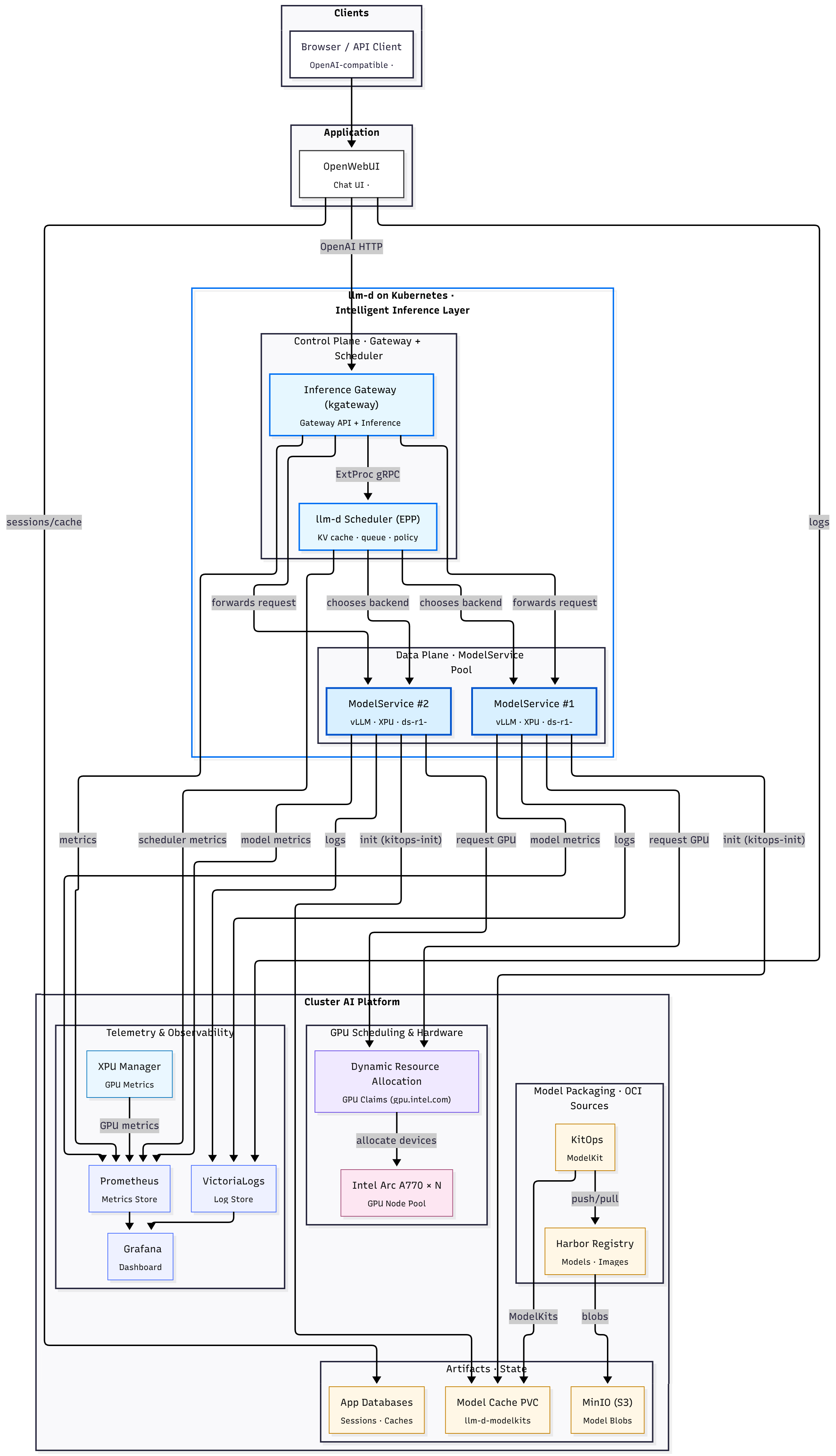
The updated flow looks like this:
- A client or Open WebUI sends a request to an OpenAI compatible endpoint
kgatewayreceives it on port 80 and matches anHTTPRoute- The
HTTPRouteforwards to anInferencePoolinstead of a Service - Envoy inside the gateway calls the Endpoint Picker (EPP) via External Processing
- The EPP looks at pod load and cache hints and returns a single backend
- Envoy forwards the request to the chosen vLLM pod
From the vLLM pod’s perspective, nothing changed. It is still just serving tokens over HTTP. From the cluster’s perspective, a whole new set of decisions became explicit and observable.
A full diagram of the added components:
04 The three llm-d components in this cluster Link to heading
In my repo, the integration lives under llm-d/inference-scheduling (link). It breaks into three pieces.
04.1 modelservice: vLLM on Intel GPUs with DRA and ModelKit Link to heading
The llm-d modelservice chart is where I declare “how many vLLM replicas, which image, which GPUs.”
The important bits from modelservice-values.yaml (full file):
modelArtifacts:
  name: "deepseek-ai/DeepSeek-R1-Distill-Llama-8B"
  uri: "hf://deepseek-ai/DeepSeek-R1-Distill-Llama-8B"  # placeholder; ModelKit PVC overrides

dra:
  enabled: true
  type: "intel-a770-single"
  claimTemplates:
    - name: "intel-a770-single"
      class: "gpu.intel.com"
      match: "exactly"
      count: 1
      selectors:
        - cel:
            expression: 'device.attributes["gpu.intel.com"].model == "A770"'

decode:
  replicas: 2
  containers:
    - name: "vllm"
      image: "intelanalytics/ipex-llm-serving-xpu:latest"
      command: ["/bin/bash", "-lc"]
      args:
        - |
          source /opt/intel/1ccl-wks/setvars.sh && \
          python -m ipex_llm.vllm.xpu.entrypoints.openai.api_server \
            --served-model-name $(SERVED_MODEL_NAME) \
            --port 8000 \
            --model /data/ds-r1-llama-8 \
            --device xpu \
            --dtype float16 \
            --tensor-parallel-size 1 \
            --enable-prefix-caching
      volumeMounts:
        - name: modelkit
          mountPath: /data  # PVC populated by kitops-init
This is basically Part 3, wrapped in a chart:
- vLLM with Intel IPEX
- one A770 per decode pod from DRA
- prefix cache enabled
- models pulled from Harbor into
/databy kitops-init
llm-d does not replace this. It assumes you know how you want to serve the model.
04.2 InferencePool: an LLM aware backend instead of a Service Link to heading
The Gateway API Inference Extension adds InferencePool as a new kind of backend. It is like a Service that knows its pods are LLM servers.
Conceptually, my pool looks like this (inferencepool-values.yaml, full file):
inferenceExtension:
  image:
    name: epp
    hub: us-central1-docker.pkg.dev/k8s-staging-images/gateway-api-inference-extension
    tag: v1.1.0
  extProcPort: 9002

inferencePool:
  apiVersion: inference.networking.k8s.io/v1
  targetPortNumber: 8000   # vLLM HTTP port
  modelServerType: vllm
  modelServers:
    matchLabels:
      llm-d.ai/role: "decode"
Three key ideas:
modelServers.matchLabelsties the pool to vLLM decode pods that serve the same modeltargetPortNumberindicates which port speaks the model protocolinferenceExtensionpackages the Endpoint Picker (EPP) that must be consulted before routing
This is the Kubernetes owned description of “these pods form a single logical LLM backend, and this is the brain that decides which one gets each request.” ([Hacker News][1])
04.3 HTTPRoute: Gateway to InferencePool Link to heading
The last piece of the path is a regular HTTPRoute that targets the InferencePool instead of a Service (httproute.yaml, full file):
apiVersion: gateway.networking.k8s.io/v1
kind: HTTPRoute
metadata:
  name: llm-d-route
  namespace: llm-d
spec:
  parentRefs:
    - name: llm-d-infra-inference-gateway
      namespace: llm-d
      kind: Gateway
  rules:
    - backendRefs:
        - name: llm-d-inferencepool
          kind: InferencePool
          group: inference.networking.k8s.io
          port: 8000
      matches:
        - path:
            type: PathPrefix
            value: /
      timeouts:
        backendRequest: 3600s
        request: 3600s
Clients do not see any of this. They still send POST /v1/chat/completions with an OpenAI style payload. The only difference is that the backend reference is an InferencePool that has an Endpoint Picker attached.
04.4 Routing and DRA Link to heading
The Endpoint Picker:
- Tracks per pod load and queue depth
- Uses cache hints and conversation metadata
- Keeps multi turn flows on the same backend when that makes sense
- vLLM exposes metrics about cache hits and token latency
- EPP uses hints and past routing decisions to keep similar prompts together
In Part 3, DRA was mostly a cleaner way to say “give this pod one Arc A770”.
With llm-d in place:
- DRA sets which pods have which GPUs
- InferencePool defines which pods form a logical backend
- EPP knows which backends exist and how busy they are
05 Lighting the path Link to heading
The llm-d maintainer called out somewhere that their main users are large inference deployers who already run Kubernetes across providers, often mixing serving, batch and training on the same fleet.
I’m not a H100 datacenter, for which this tooling can generally solve a lot more problems, but even on my two A770s, you can see benefit and learning value from having this layer in place. Examples I have here are basically the Intelligent Inference Scheduling well lit path from their docs, however llm-d is more than that and capabilities have been steadily growing, since I first tried it in October.
When the llm-d docs talk about “well lit paths”, they mean concrete, tested recipes, not another “hello world” Helm chart. Each path is a configuration that’s been documented, benchmarked and wired the way real clusters run in production, so you start from something proven instead of hacking in the dark. Right now the main paths are:
- Intelligent Inference Scheduling – vLLM running behind the Inference Gateway, with prefix cache aware routing and scheduling policies that actually move the needle on latency and throughput.
- Prefill/Decode Disaggregation – splitting prompt handling and token generation across different servers to cut time to first token and stabilize time per output token on larger models and long prompts.
- Wide Expert Parallelism – a setup for very large MoE models like DeepSeek R1, using data and expert parallelism across fast accelerator networks.
- Tiered Prefix Cache – an extra path that layers a multi-tier prefix cache on top (for example offloading to CPU RAM) and can be combined with any of the above to squeeze more reuse out of long or concurrent workloads.
More in the official Well-Lit Path Guides.
06 Conclusion: why llm-d matters to me Link to heading
Since I started this homelab project, the surface area has grown, but the core activity has not changed much:
- Run DeepSeek R1 locally
- Containerise it
- Schedule it on Intel GPUs in Kubernetes
- Scale it across more pods or devices
The outcome from the outside is trivial: a prompt goes in, tokens come out, some GPUs are busy. Hardware is the same.
The interesting part has moved from “can I make this run at all” to how the cluster thinks this workload is, tinkering with the idea how a production grade LLM inference setup could behave, dissecting the pieces and seeing how they fit together.
It’s just really fun.